Billing & credits
After this page, you'll know how to pick a plan, buy extra credits when you run low, and read exactly where every credit went — all from one billing page.
Everything in Qalyb runs on credits. Your plan gives you a monthly pool of included credits, and every billable action — a minute of voice, a chat reply, a Studio API call — draws it down. When you need more, you buy a one-time credit pack. The conversion is simple: 1 credit costs about $0.01, so 100 credits is roughly $1.
Find your billing page
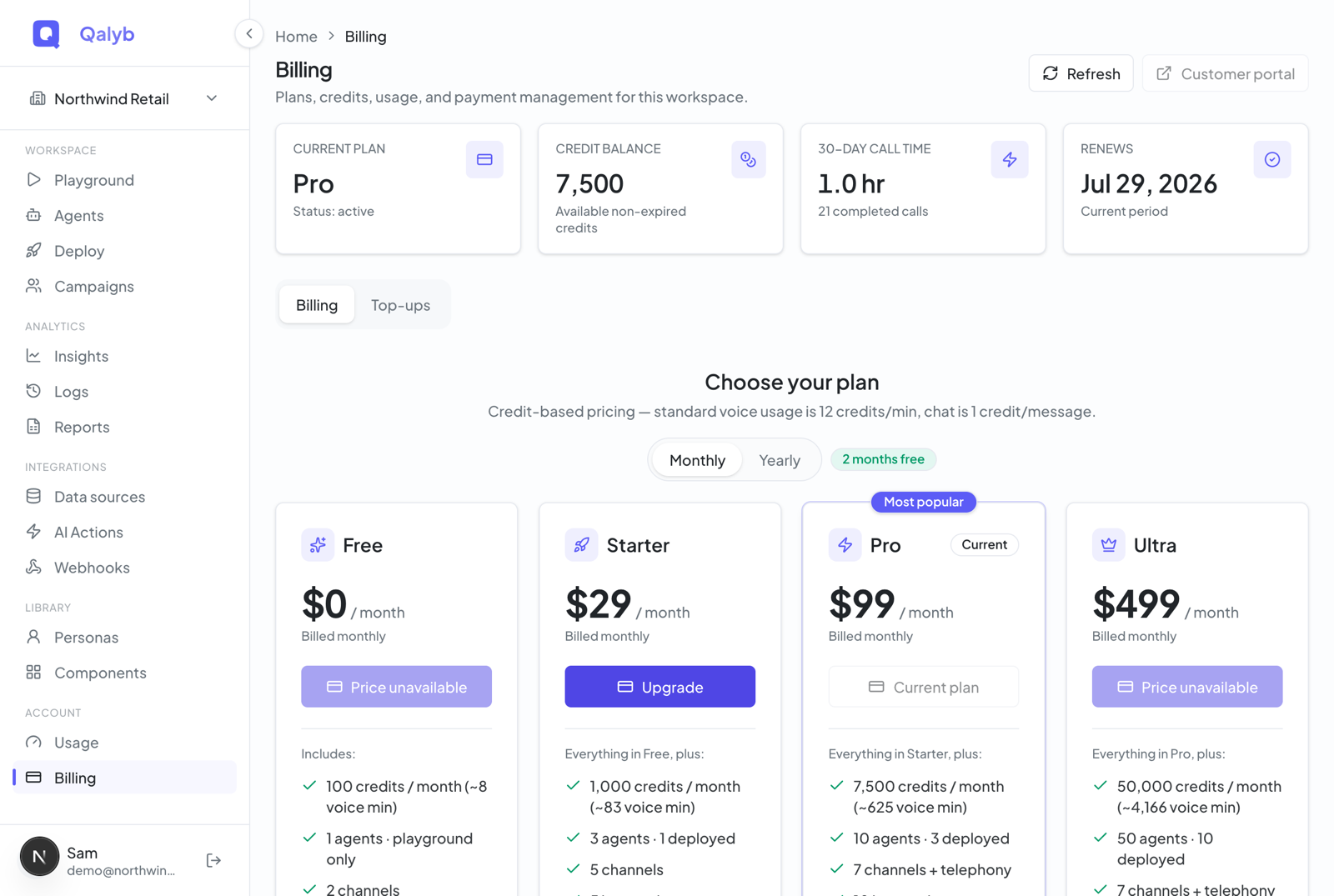
Open Account → Billing from the sidebar (the /billing page). The top of the page shows four cards — Current plan, Credit balance, 30-day call time, and your Renews date — followed by two tabs:
- Billing — the plan picker (Free, Starter, Pro, Ultra) with a Monthly/Yearly toggle and a "Compare all plans" table.
- Top-up & usage — one-time credit packs plus your usage breakdown, API activity, and the credit ledger.
Your balance refreshes on its own every 30 seconds, and there's a Refresh button if you want an immediate update right after a purchase.
Pick a plan
Each plan card lists exactly what it includes — channels, deployed agents, knowledge size, team members, and features — read live from the plan catalog, so what you see is what you get. Pro carries the "Most popular" flag.
| Plan | Price | Included credits / mo | What you get |
|---|---|---|---|
| Free | $0 | 100 (~8 voice min) | Playground only — no deployed agents, no channels. 14-day retention. Carries the "Powered by Qalyb" badge. |
| Starter | $29 / mo · $290 / yr | 1,000 (~83 min) | 3 agents, 1 deployed, 2 members. Email + Telegram + WhatsApp (coming soon) channels (max 2). Insights, 10MB knowledge, 1 voice clone, 30-day retention. |
| Pro (Most popular) | $99 / mo · $990 / yr | 7,500 (~625 min) | 10 agents, 3 deployed. All channels incl. SIP (Messenger & Instagram coming soon). Campaigns, webhooks, API keys, custom branding/domain, exports, post-call analysis, reports, priority support. 20MB knowledge, 5 clones, 90-day retention. No badge. |
| Ultra | $499 / mo · $4,990 / yr | 50,000 (~4,166 min) | 50 agents, 10 deployed. Everything in Pro at higher limits. 40MB knowledge, 20 clones, 365-day retention. |
| Enterprise | Custom | Custom | SSO, dedicated deployment, and unlimited limits. Not in the public picker — it appears as a "Contact sales" strip (sales@qalyb.ai). |
On the billing page, stay on the default Billing tab.
Toggle Monthly or Yearly. Yearly is billed annually and shows a "2 months free" badge — you get roughly two months free.
Select Free, Starter, Pro, or Ultra.
You're taken to Stripe Checkout. After payment, your new plan and its included credits appear back in Qalyb.
Scroll to Compare all plans to see every limit side by side, or click Contact sales for Enterprise.
Top up with credit packs
Running low between renewals? Switch to the Top-up & usage tab and buy a one-time credit pack through Stripe Checkout. Packs stack on top of your plan's included credits.
| Pack | Price | Credits |
|---|---|---|
| Small | $50 | 5,000 |
| Team | $250 | 27,500 |
| Scale | $1,000 | 120,000 |
See where your credits go
The Top-up & usage tab is also where you audit spending. It has three sections:
- Usage (last 30 days / current month) — credits spent and event counts, broken down by type: voice minutes, chat messages, knowledge queries, web searches, and Studio API usage.
- API category — for Studio API users, a table of requests, audio time, input characters, and tokens over the last 30 days.
- Recent activity — the credit ledger: a permanent, chronological list of every credit change (Stripe payments, plan renewals, and usage) with the reason, direction (credit or debit), amount, and date.
What each action costs
Every billable action has a fixed credit price:
| Usage type | Credits | Notes |
|---|---|---|
Voice — voice.minute | 12 / min | Billed by delivered seconds, recorded when the call completes. |
Chat — chat.message | 1 / message | One credit per assistant reply. |
Knowledge lookup — kb.query | 0.5 / query | Each knowledge-base lookup. |
Web search — web.search | 1.0 / search | Each web search an agent runs. |
Studio text-to-speech — api.tts_char | 0.003 / char | Per character of generated speech. |
Studio speech-to-text — api.stt_second | 0.05 / sec | Per second of transcribed audio. |
Studio LLM tokens — api.llm_token1k | 0.6 / 1k tokens | Per thousand tokens. |
API request — api.request | 0 | API requests are free by default. |
Each usage event is recorded exactly once and taken from your non-expired credits. Credits burn down in a fixed order — lowest priority, soonest to expire, oldest first — so credits about to lapse are spent before fresh ones.
When you hit a limit
Two kinds of gates protect each plan. Plan limits stop you creating more than your plan allows — extra agents, members, channels, voice clones, integrations per agent, or knowledge beyond your size cap. When you hit one, the action is blocked with an "Upgrade your plan" message (a 403 for developers). Some menu items (Insights, Reports) are simply hidden on plans that don't include them.
Credit balance limits apply to hard-limit plans — today that is only Free. When a Free workspace runs out of credits, widget voice shows an upgrade prompt (an HTTP 402 for developers) and widget chat gracefully degrades. Paid plans (Starter, Pro, Ultra) are soft-limit — they keep working, and any overage is logged for review rather than blocked.
max_deployed_agents), so you can build and test in the playground but can't connect a channel, widget, phone number, or share link until you upgrade. The message reads "Your plan is playground-only."For developers
The dashboard covers everything most teams need, but the same actions are available over the API. Reading the summary requires billing:read; checkout requires billing:write (admins only).
Fetch the full billing summary — plan, balance, plan catalog, usage, and ledger:
curl https://api.qalyb.ai/billing \
  -H "Authorization: Bearer sk-live-..."
Start a subscription checkout (returns a Stripe Checkout URL):
curl -X POST https://api.qalyb.ai/billing/checkout/subscription \
  -H "Authorization: Bearer sk-live-..." \
  -H "Content-Type: application/json" \
  -d '{
    "planKey": "pro",
    "interval": "month"
  }'
Buy a one-time credit pack:
curl -X POST https://api.qalyb.ai/billing/checkout/credits \
  -H "Authorization: Bearer sk-live-..." \
  -H "Content-Type: application/json" \
  -d '{
    "packKey": "team"
  }'