Choose a voice and dialect
A persona decides how your agent sounds — which voice it speaks with, in what language and dialect, and with what tone. You'll create one in about a minute and reuse it across as many agents as you like.
Every agent needs to sound like something. A persona packages that up: a voice from the catalog, a language, an optional dialect, a communication style, personality traits, and free-text speaking instructions. Build a persona once and attach it to as many agents as you like — change the persona and every agent using it speaks differently on the next call. Personas live under Library › Personas and belong to your organization; any admin or member can create and edit them.
In the sidebar, go to Library › Personas. The list shows every persona in your organization, in list or grid view — toggle with the List/Grid control.
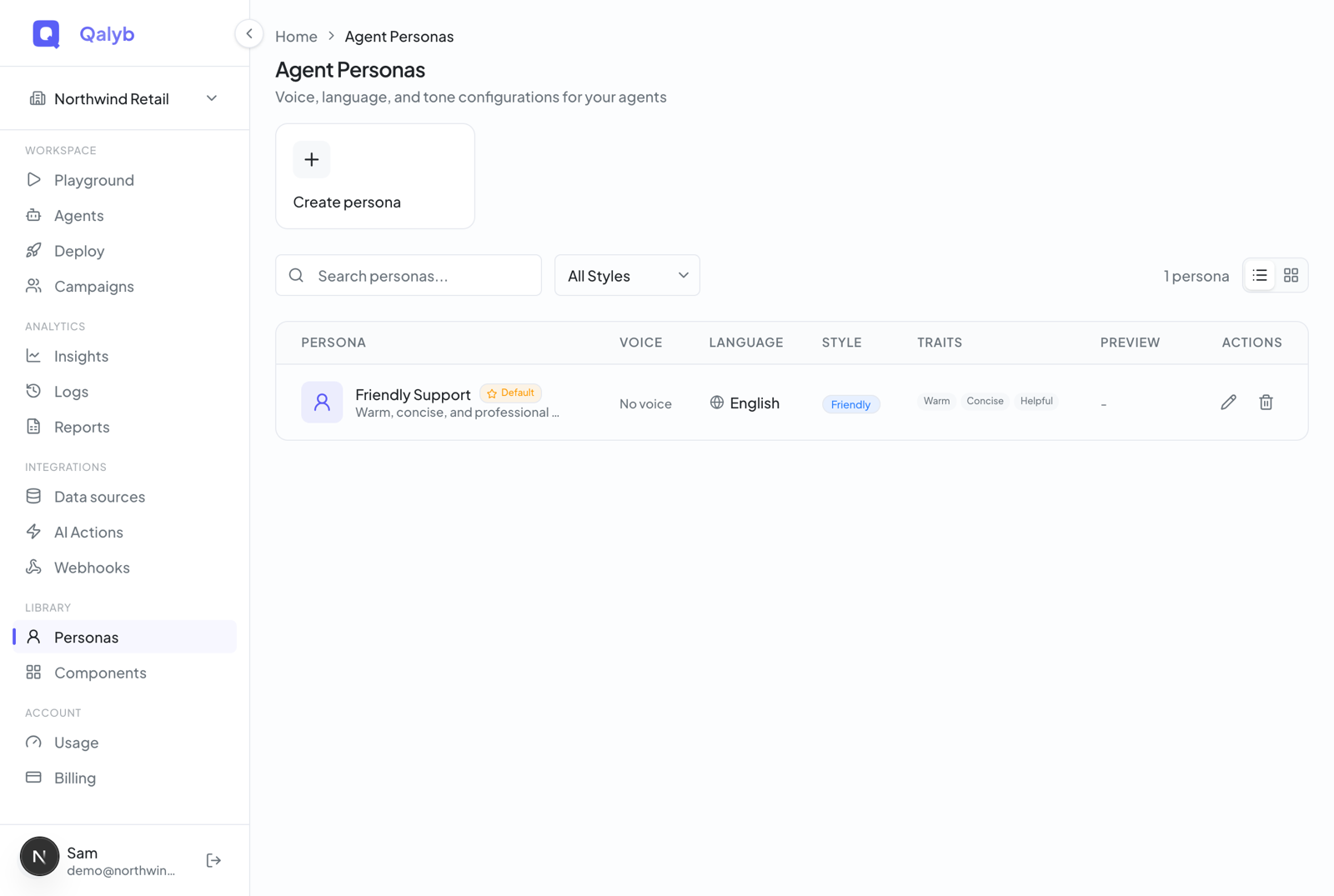
Click the Create persona card. A panel titled Agent Persona slides in from the right with all the fields.
Enter a Name (required) and an optional Description so teammates know what the persona is for.
Choose a Voice from the dropdown (it lists only active voices from your catalog), then a Language. If dialect presets exist for that language, the Accent dropdown lets you pick one; otherwise it stays disabled with a No accents for this language hint.
Pick a Communication Style, toggle the Personality Traits that fit, and write Speaking Instructions — greetings, pacing, and any phrasing rules.
Optionally tick Set as default persona, then click Create Persona. It's now ready to attach to any agent.
What's inside a persona
| Field | What it does |
|---|---|
| Name | Required. How you'll recognize the persona in lists. Up to 100 characters. |
| Description | Optional internal note. Up to 500 characters. |
| Voice | The voice the agent speaks with. The dropdown lists only active voices from your Voices catalog. |
| Language | One of English, Spanish, French, German, Italian, Portuguese, Dutch, Japanese, Korean, Chinese, Arabic, or Hindi. |
| Accent | Optional dialect preset. Only presets that match the persona's language — and that are active — appear here. |
| Communication Style | One of Formal, Casual, Friendly, or Professional. |
| Personality Traits | Pick any of: enthusiastic, calm, empathetic, assertive, patient, helpful, confident, warm, friendly. |
| Speaking Instructions | Free text — phrasing, pacing, greetings, anything that shapes delivery. Up to 2,000 characters. |
| Set as default | Checkbox. Marks this as your organization's default persona for new agents (see below). |
Getting the dialect right
For GCC audiences, dialect match matters more than almost anything else. A Modern Standard Arabic voice can sound stiff to a Khaleeji caller, and a Levantine voice can feel out of place in the Gulf. Pick the voice closest to your callers, then reinforce it with a line or two of speaking instructions (for example, open with a Khaleeji greeting and keep sentences short).
Voices, personas, and models — who does what
It helps to keep three layers straight. A persona never duplicates a voice or a model; it only references them.
- Voices catalog — the pool of voices (Qalyb system voices plus your organization's custom voices) that a persona picks from. The persona's Voice dropdown is just this catalog, filtered to active voices.
- Accents — dialect presets that layer a speaking-style instruction on top of a language. A persona optionally attaches one.
- Models — the AI that thinks and listens behind the agent. These are organization-wide model defaults, not part of the persona. A persona governs how the agent sounds; models govern how it thinks and listens.
The default persona
Exactly one persona per organization can be flagged as the default. It has two jobs:
- No agent is ever voiceless. When you create your organization's first agent, Qalyb auto-creates a Default persona if none exists, so the agent always has a voice to fall back on.
- Setting a new default clears the old one. Tick Set as default persona on a different persona and the previous default is un-flagged automatically — there's never more than one.
Attach it to an agent
A persona does its work through agents. You pick it while building or editing an agent, and because the agent references the persona rather than copying it, editing the persona later updates every agent attached to it. See Your agent, explained for where the persona fits in the builder.
Edit or remove a persona
Open a persona from the list (click the row or its pencil icon), then click Edit. Change any field across the Persona Details, Voice & Language, and Tone & Style sections, then Save Changes. To remove a persona, use the trash icon in the list.
For developers
Personas have a full CRUD API under /agent-personas. Reads require agents:read; creates and updates require agents:write (admin or member); deletes require agents:delete (admin).
| Endpoint | Purpose | Permission |
|---|---|---|
GET /agent-personas | List the org's personas | agents:read |
GET /agent-personas/:id | Fetch one persona with its joined voice and accent | agents:read |
POST /agent-personas | Create a persona | agents:write |
PATCH /agent-personas/:id | Update a persona | agents:write |
GET /agent-personas/:id/deletion-impact | List the agents a delete would need reassigned | agents:read |
DELETE /agent-personas/:id?reassignTo= | Delete a persona, moving its agents to the persona you name | agents:delete (admin) |
Agents must always have a persona, so a persona that still has agents on it can't be deleted outright. Pass ?reassignTo=<personaId> to move them as part of the delete; without it the API answers 409 PERSONA_IN_USE and lists the agents holding it. Agents you have already deleted don't block anything — they move to your default persona on their own.
Create a persona programmatically:
curl -X POST https://api.qalyb.ai/agent-personas \
  -H "Authorization: Bearer sk-live-..." \
  -H "Content-Type: application/json" \
  -d '{
    "name": "Gulf Concierge",
    "description": "Warm, formal receptionist for Gulf-Arabic callers.",
    "voiceId": "f0a1b2c3-4d5e-6f70-8a91-2b3c4d5e6f70",
    "language": "ar",
    "accentId": "a9b8c7d6-1234-4e5f-90ab-cdef12345678",
    "communicationStyle": "formal",
    "personalityTraits": ["warm", "patient", "helpful"],
    "speakingInstructions": "Open with a Khaleeji greeting. Keep sentences short and reassuring.",
    "isDefault": false
  }'
List personas to grab an id:
curl https://api.qalyb.ai/agent-personas \
  -H "Authorization: Bearer sk-live-..."
Attach a persona to an agent by passing its id as personaId:
curl -X PATCH https://api.qalyb.ai/v1/agents/agt_abc123 \
  -H "Authorization: Bearer sk-live-..." \
  -H "Content-Type: application/json" \
  -d '{ "personaId": "f47e2c12-8b8d-4f8e-9b16-7c1a8f9c3a01" }'