Frequently asked questions
Quick answers to the questions people ask before and just after they start building. For the full story on any topic, follow the links along the way.
Pricing & credits
How does pricing work?
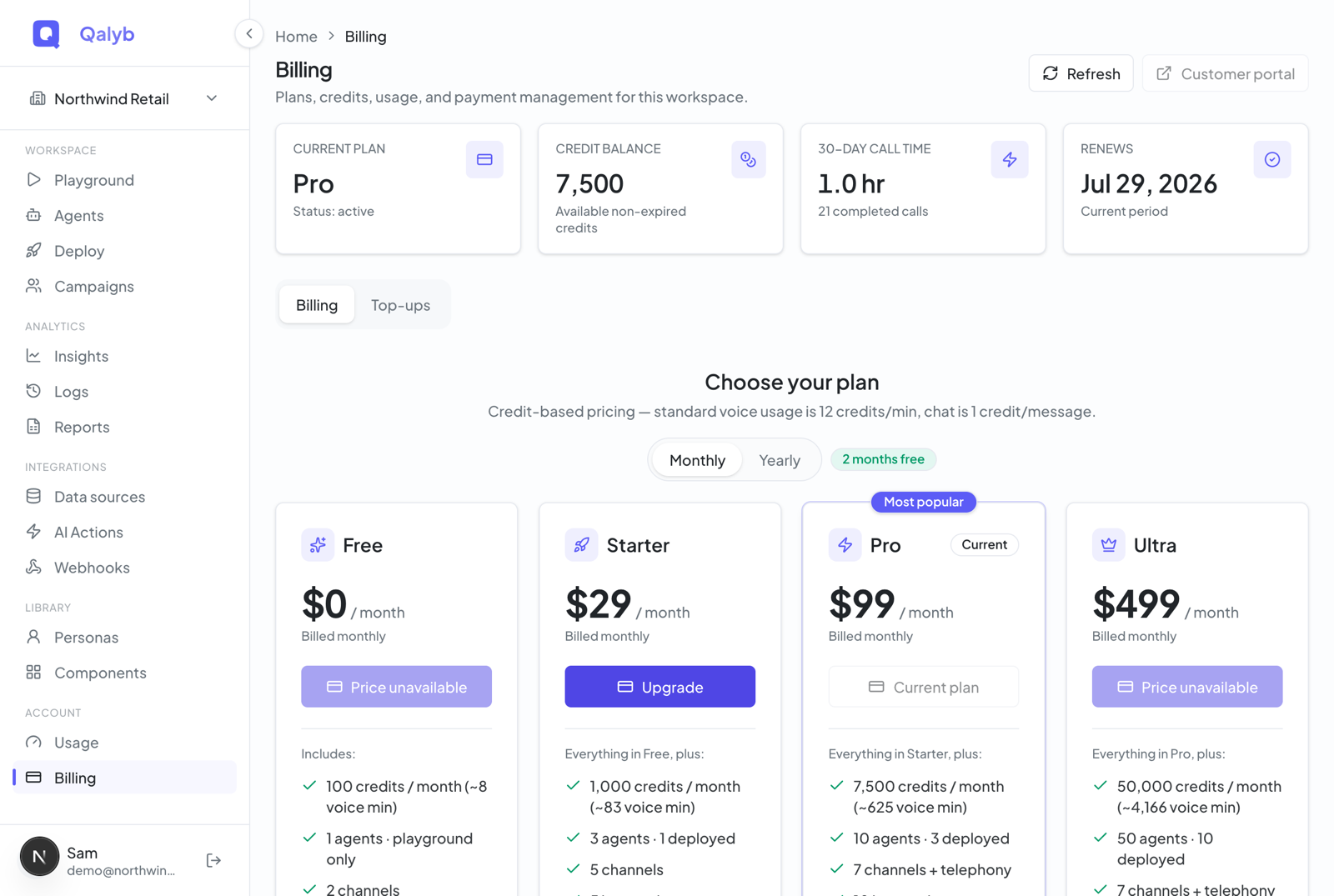
Qalyb runs on credits. You pick a plan that includes a monthly allowance, and every billable action draws it down. The conversion is fixed: 1 credit ≈ $0.01, so 100 credits is $1. You manage your plan, check your balance, and review usage on the /billing page.
What plans are there, and what do they cost?
Four self-serve plans, plus a custom Enterprise tier:
| Plan | Price | Included credits / month | Deployed agents |
|---|---|---|---|
| Free | $0 | 100 (~8 voice min) | 0 — playground only |
| Starter | $29/mo · $290/yr | 1,000 (~83 min) | 1 |
| Pro (most popular) | $99/mo · $990/yr | 7,500 (~625 min) | 3 |
| Ultra | $499/mo · $4,990/yr | 50,000 (~4,166 min) | 10 |
| Enterprise | Custom | Custom | Unlimited |
Paying yearly gets you roughly two months free versus monthly. Enterprise is sold through Contact sales and adds SSO, dedicated deployment, and unlimited limits.
What does each action cost?
The standard rates, in credits:
| Usage | Cost |
|---|---|
| Voice (per minute) | 12 credits |
| Chat (per agent reply) | 1 credit |
| Knowledge base lookup | 0.5 credit |
| Web search | 1 credit |
Voice is counted by delivered seconds — a 30-second call bills half a minute. And every reply your agent sends over chat, WhatsApp, Telegram, Messenger, Instagram, or email counts as one chat credit.
Can I buy extra credits without changing my plan?
Yes. On the Top-up & usage tab of /billing you can buy one-time credit packs: Small ($50 → 5,000 credits), Team ($250 → 27,500 credits), and Scale ($1,000 → 120,000 credits). Purchased credits expire 12 months after purchase.
What happens if I run out of credits?
On the Free plan, which is hard-limited, voice and chat stop once your balance hits zero (the widget shows an upgrade prompt). Paid plans are soft-limited today, so a temporary shortfall won't abruptly cut off a live conversation. Your Free monthly credits reset each billing period.
Languages & dialects
Which languages can my agent speak?
Personas — the voice-and-tone bundle every agent uses — can be set to English, Spanish, French, German, Italian, Portuguese, Dutch, Japanese, Korean, Chinese, Arabic, and Hindi. The voices on offer vary by language.
Does it understand Arabic dialects?
Yes — GCC dialects are a first-class concern. Speech recognition covers Gulf and regional Arabic (for example ar-OM, ar-AE, ar-SA, ar-EG), and Qalyb curates Accents — named dialect presets a persona layers on to shape how it speaks in a given language. Qalyb also runs its own Arabic voice engine, used for Arabic and English voice cloning.
Will my agent stick to one language?
An agent's language follows its persona and its instructions. Pick the persona language that matches your audience and write the instructions in (or about) that language. See How Qalyb works for how personas, voices, and accents fit together.
Channels
Where can my agent talk to customers?
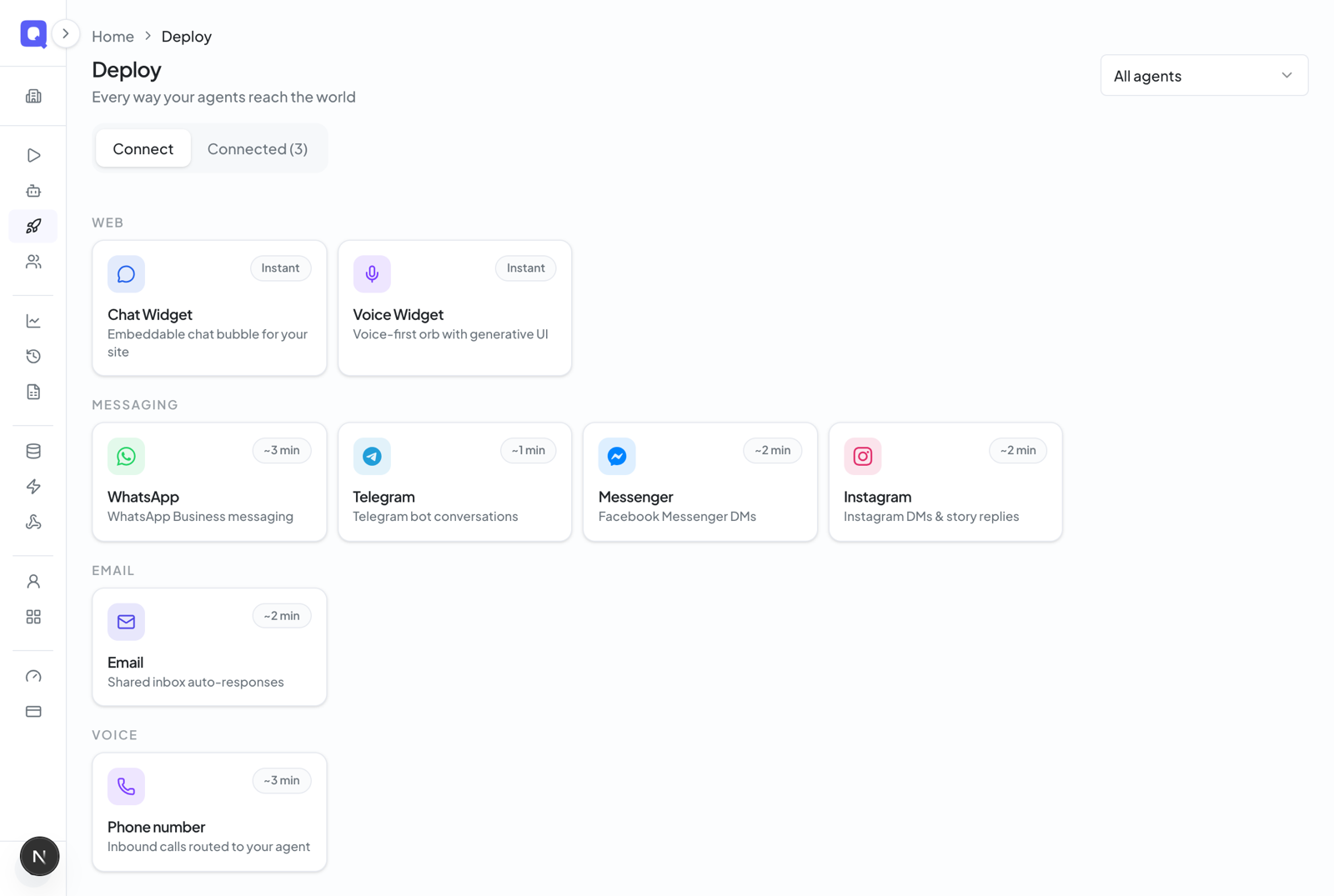
Everything is connected from the Deploy hub (the Channels page). Your agent can work on:
- Your website — an embeddable chat widget and voice widget
- Share links — a public URL anyone can talk to, no login required
- WhatsApp (coming soon) — connect your WhatsApp Business number via Meta's signup window
- Telegram — connect a bot with a single BotFather token
- Messenger and Instagram (coming soon) — answer DMs via a linked Facebook Page
- Email — a hosted Qalyb address or your own verified domain (via AgentMail)
- Phone — inbound and outbound voice on a phone number
Do I get every channel on every plan?
No — channels are gated by plan:
| Plan | Channels | Max connected channels |
|---|---|---|
| Free | None (playground only) | 0 |
| Starter | Telegram, Email, WhatsApp (coming soon) | 2 |
| Pro / Ultra | All channels (incl. Phone; Messenger & Instagram coming soon) | Unlimited |
Messenger and Instagram share one entitlement and unlock on Pro. Connecting a channel also needs at least one deployed agent slot — which is why the Free plan is playground-only.
Data & privacy
Where do my conversations live?
Conversations from every channel — voice, chat, WhatsApp, Telegram, Messenger, Instagram, and email — are stored as sessions tied to your workspace, so they show up in your logs and insights. Media people send in (voice notes, images, documents) is kept in cloud storage and served back through short-lived signed links.
How long is my data kept?
Retention grows with your plan: 14 days on Free, 30 days on Starter, 90 days on Pro, 365 days on Ultra, and custom retention on Enterprise.
Can other companies see my agents or data?
No. Agents, personas, voices, knowledge bases, channels, and billing are all scoped to your workspace. Qalyb staff can only access your workspace when you ask us for support.
What about consent for voice cloning?
Voice cloning legally requires consent: the clone request must confirm you have the speaker's permission, and Qalyb records a consent timestamp on the cloned voice. Cloning runs on Qalyb's own Arabic voice engine, and the resulting voice belongs to your workspace only — it's never added to the global catalog.
Agent knowledge & training
How do I teach my agent about my business?
Create a knowledge base (called Data sources in the sidebar) and add documents: upload files (PDF, DOCX, TXT, MD, CSV, JSON, HTML, and common code types), add a URL to scrape, or paste raw text. Then attach the knowledge base to an agent in its Data sources section. During conversations the agent searches it to ground its answers.
Do I need to "train" or "retrain" it?
No. Documents are indexed the moment you add them — adding, editing, or re-scraping a document re-indexes it right away. There's no training run to kick off and no waiting for a nightly job.
How big can a knowledge base be?
There's no cap on the number of knowledge bases. The real limit is total content size across all your documents: 400 KB on Free, 10 MB on Starter, 20 MB on Pro, 40 MB on Ultra, and unlimited on Enterprise. A single file can be up to 100 MB, but it still counts against your plan's total allowance.
Common limits
Which limits should I know about up front?
- Deployed agents — how many agents can be live on a channel at once: Free 0, Starter 1, Pro 3, Ultra 10.
- Cloned voices — Free 0, Starter 1, Pro 5, Ultra 20, Enterprise unlimited.
- Team members — Starter 2, Pro 10, Ultra 50.
- Knowledge content size — see the table above (400 KB → unlimited).
- Files — up to 100 MB each; text documents only.
When you hit a limit, Qalyb tells you clearly with an "upgrade your plan" message at the moment you try the action — nothing fails silently.
What can I actually do on the Free plan?
Free is for trying things out: build agents, give them personas and knowledge, and test them in the Playground. It doesn't let you connect channels or put an agent in front of real customers — for that you need Starter or higher.
Want more detail?
- How Qalyb works — how agents, personas, channels, and knowledge bases fit together.
- Billing & credits — plans, top-ups, and the full pricing.
- Where it works — connect WhatsApp, Telegram, email, and more.