How Qalyb works
Meet the moving parts: the agent, its voice, what it knows, what it can do, and where it talks to customers. Read this once and every other page in the docs makes sense.
Qalyb lets you build an agent — an AI worker that talks to your customers for you. You give it a voice and tone (a persona), teach it your business (data sources), let it take real actions (AI Actions), and put it wherever your customers are (channels). Every conversation it has is recorded for you to review, and metered in credits.
This page explains each part in plain words — the step-by-step guides are linked along the way.
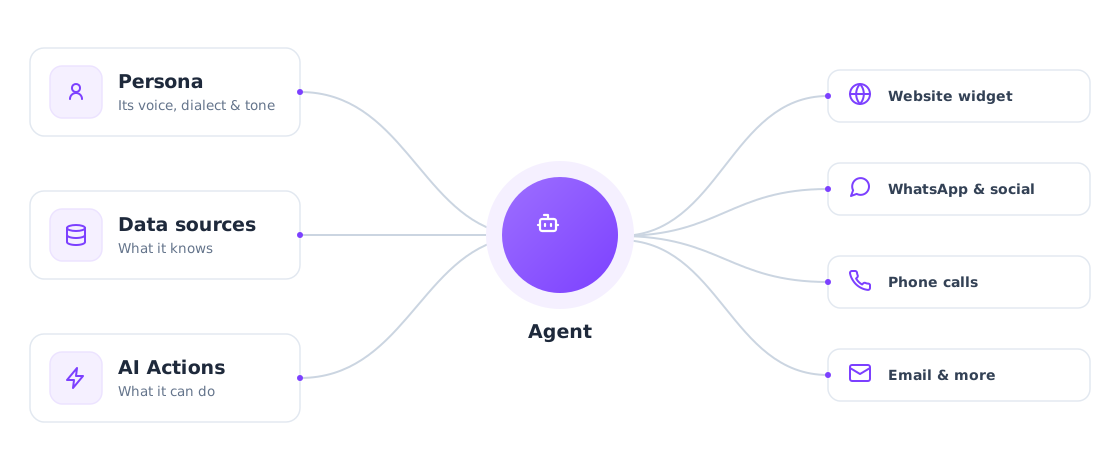
The agent
An agent is the AI worker that holds a conversation on your behalf — answering support questions, qualifying leads, booking appointments. The same agent can talk over voice and over chat; the channel decides which.
One agent bundles everything about how it behaves:
- Identity — its name, status (Active / Paused / Archived), description, and a first message (the greeting it opens every conversation with).
- A persona (required) — the voice and tone it speaks with.
- Instructions — its system prompt, with
@-mention variables you fill in per conversation. - Data sources — the knowledge bases it can search.
- AI Actions — the actions and integrations it can call.
- Success criteria & data extraction — how each conversation is scored after it ends, and which fields to pull out of the transcript.
You build agents on the Agents page — either through the guided wizard (see Create your first agent) or the advanced builder (see Your agent).
The persona (its voice and tone)
A persona is a reusable voice-and-tone bundle that an agent attaches to. It's what makes an agent sound like a calm Gulf-Arabic concierge rather than a brisk English sales rep. Every agent must have one — you can't save an agent without it.
A persona combines:
- A voice — picked from the voice catalog.
- A language and an optional accent (dialect preset).
- A communication style — Formal, Casual, Friendly, or Professional.
- Personality traits — for example enthusiastic, calm, empathetic, assertive, patient.
- Speaking instructions — free-text guidance on how to talk.
Personas live on the Personas page and are shared across your whole workspace, so one persona can dress many agents. If you have none yet, Qalyb creates a default the first time an agent is generated — an agent is never left without a voice. See Voice & dialect.
Data sources (what your agent knows)
A data source — labeled knowledge base on its own page — is a named collection of content your agent searches while it talks. Instead of baking facts into its instructions, the agent looks them up live and answers only from what it finds.
You can add content four ways:
- File — upload PDF, DOCX, TXT, MD, CSV, JSON, HTML, or code (up to 100 MB each). Images, audio, and video can't be indexed.
- URL — point at a web page; Qalyb reads it and can re-read it on demand.
- Text — paste it straight in.
- Folder — group documents inside a knowledge base.
There is no "retrain" button — adding, editing, or re-reading a document updates what the agent searches immediately. When you attach a ready knowledge base to an agent, it becomes a search action named after the base, and each lookup costs half a credit. See Add your business info.
AI Actions (what your agent can do)
An AI Action lets the agent do something, not just talk. There are three kinds:
- Built-in actions — included in every workspace:
web_search(search and read the live web),crawl_website(read a whole site into a knowledge base in the background),end_call, andtransfer_call. - Custom actions — webhook tools that call your own systems with details the agent fills in.
- Integrations — 500+ apps you connect with a sign-in flow; their tools import automatically once linked.
You manage these under AI Actions in the sidebar, then switch them on per agent. See Let it take actions.
POST /tools API. Built-in actions and connected integrations are configured right in the agent editor.Components (rich replies in chat)
A component is a custom piece of UI — a card, a form, a product tile — that a chat agent can show in the middle of a conversation instead of plain text. You define one once (with a small DSL, a schema, and states), attach it to an agent, and the agent shows it when it's relevant. Components live under Components in the sidebar. See Rich replies in chat.
Channels (where it meets customers)
A channel is a place your agent talks to customers. The Deploy page lists every connected channel in one spot and is where you connect new ones. An agent connected to any channel is a deployed agent.
| Channel | What it is |
|---|---|
| Chat widget | An embeddable chat box for your website. |
| Voice widget | An in-browser voice call surface. |
| Your WhatsApp Business number, connected via Meta Embedded Signup. | |
| Telegram | A Telegram bot connected with a single BotFather token. |
| Messenger & Instagram | A Facebook Page's Messenger DMs and a linked Instagram account's DMs. |
| A Qalyb-hosted address or your own verified domain, via AgentMail. | |
| Phone | An inbound or outbound telephone number. |
| Share link | A public, no-login URL anyone can use to talk to the agent. |
Every messaging channel and email flows into the same conversation engine, so everything shows up together in your logs and analytics. See Where it works.
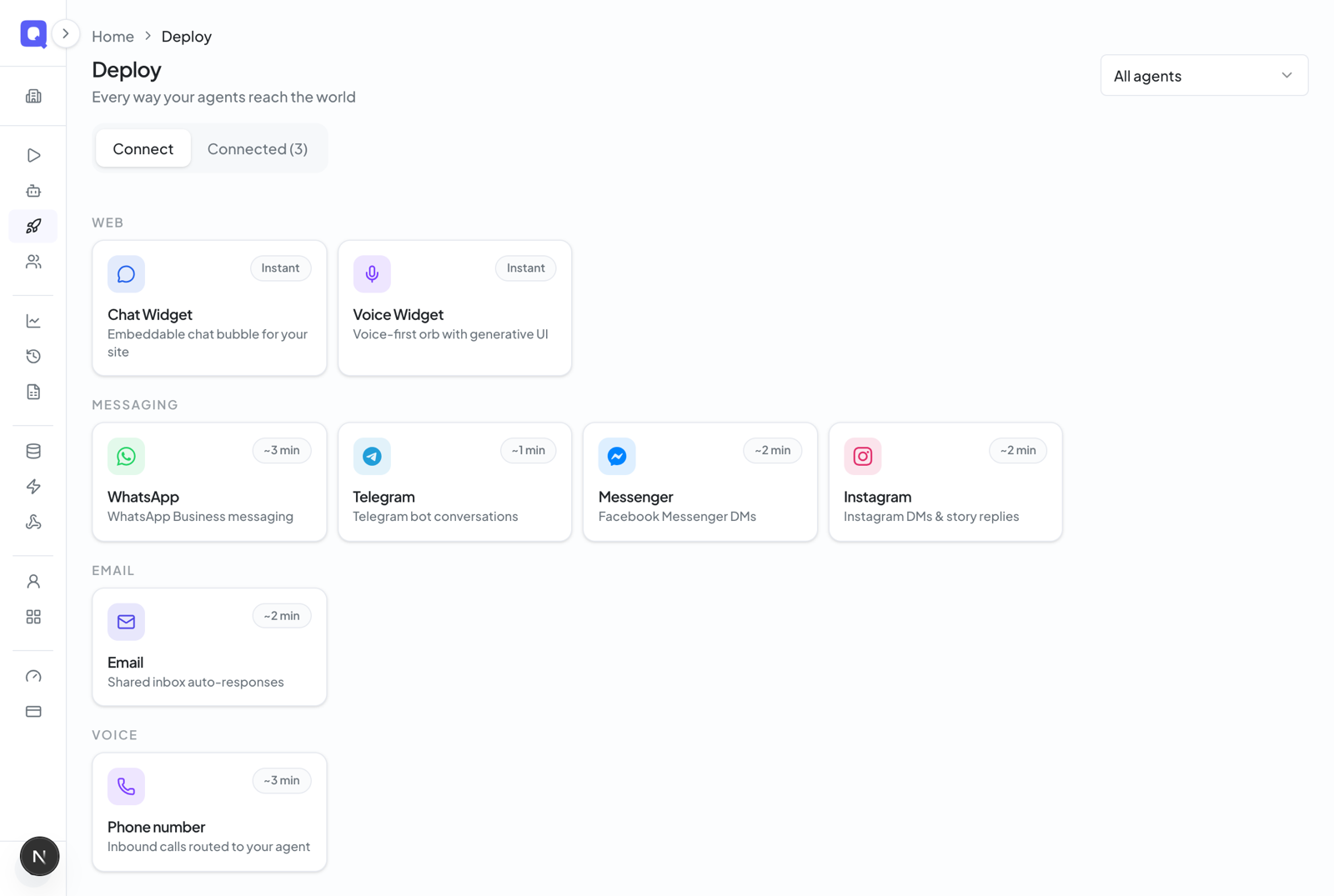
Conversations (what you learn from every chat and call)
A conversation is one exchange between a customer and an agent. Over a phone number or the voice widget it's a call; over the chat widget, WhatsApp, Telegram, Messenger, Instagram, or email it's a chat session. Either way, Qalyb records it as a session you can review — the full transcript, plus (when you've set them up) a success score and the fields you asked it to extract. That's what powers Insights.
Campaigns (reaching out first)
A campaign flips the direction: instead of waiting for customers to reach out, your agent works through a list of contacts — a batch of phone calls or WhatsApp messages. Campaign conversations remember which campaign they belong to and how they ended, and feed back into your analytics and billing. Outbound campaigns are a plan-gated feature. See Campaigns.
Credits (what it costs)
Qalyb billing is credit-based: usage is metered and deducted from your balance, where 1 credit ≈ $0.01 (100 credits = $1). The standard rates:
| Usage | Cost |
|---|---|
| Voice | 12 credits per minute (billed by delivered seconds) |
| Chat | 1 credit per assistant reply |
| Knowledge base query | 0.5 credits per lookup |
| Web search | 1 credit per search |
Every plan includes a monthly credit allowance, and you can buy one-time top-up packs that last 12 months. Plans — Free, Starter, Pro, Ultra, and a custom Enterprise tier — also set limits like how many agents you can deploy, which channel types you can connect, and how much knowledge content you can store. The Free plan is playground-only: you can build and test agents but not put them on a channel. See Billing & credits.
Your workspace (team and roles)
Everything above lives inside your organization — your workspace. It owns the agents, personas, knowledge bases, channels, credits, and billing, and what each teammate can do depends on their role:
- Member — can build and edit agents, personas, and knowledge bases. Billing is read-only, and admin-only areas (Deploy, connecting integrations, deletes) are hidden.
- Admin — everything a member can do, plus connect channels, manage billing, delete resources, and save agents as templates.
See Team & roles.
How it all fits together
To put a working agent in front of customers, the typical path is:
- Pick or create a persona so the agent has a voice and tone.
- Create an agent and write its instructions.
- Attach data sources so it answers from your content, and switch on AI Actions so it can get things done.
- Connect a channel (or share a link) to deploy it.
- Watch the conversations roll in — scored, metered in credits, all inside your organization.